SMS Terms
Truvee Verification Alerts provides optional transactional phone-confirmation codes, enrollment acknowledgements after successful phone confirmation, request-opened alerts for account holders and record-ready alerts for eligible subscribers. No marketing or promotional SMS. Initial invitations arrive by email or personally shared link, not server-originated invitation SMS.
Recipients: open their verification link, enter their own phone, check the optional fresh unchecked SMS checkbox and request a confirmation code. Alerts are off until a valid code is entered. This establishes phone possession, not legal identity. Verification can be completed without SMS.
Account holders: sign in, open Settings, enter their own phone, check the optional fresh unchecked SMS checkbox, request a code and confirm it. Alerts are off until possession is confirmed. Eligible alerts concern future verifications they send. Account use does not require SMS. Historical unconfirmed preferences do not enable alerts.
Changing a number requires fresh consent and confirmation for both account holders and recipients. Editing an unsaved field does not revoke the previous saved preference. Requesting a new code replaces the saved preference with pending enrollment and disables alerts until confirmation. Turn SMS off in the applicable preference control or reply STOP.
Frequency: separate budgets reserve up to 2 status messages per phone per verification, up to 2 recipient code requests per verification and up to 2 enrollment acknowledgement attempts per successful enrollment. Acknowledgements have one initial attempt and at most one user-requested retry after a confirmed failure, at least 60 seconds later. Accepted or uncertain attempts are not resent. Codes and acknowledgements do not consume status-message slots. Failed or ambiguous attempts consume their own category's budget. Limits count application messages; a long message may use multiple carrier SMS segments.
Code limits across both roles: at most 3 per phone per hour, at least 60 seconds apart. Codes expire after 10 minutes and allow at most 5 guesses before confirmation. No automatic resend or catch-up status alerts. Recipients receive record-ready alerts; account holders may receive request-opened and record-ready alerts. The same status event for the same phone and verification is deduplicated across roles.
Account enrollment codes: at most 2 per account per hour and 5 per rolling 24 hours, across number changes. Each successful fresh enrollment has its own acknowledgement limit; account acknowledgements are not charged to a verification's status budget. The shared phone limits apply across both flows. At most 10 code requests per IP address per hour across flows; shared networks may reach this limit. These are maximum limits, not guaranteed message frequency. For a recipient verification, two code requests can establish at most two enrollments: up to 2 code attempts plus 4 acknowledgement attempts, separately from the phone's up-to-2 status messages.
Successful code entry confirms enrollment, not message delivery. The website shows acknowledgement status and any eligible retry. If a send's outcome is unknown, contact support rather than resending. A confirmed preference remains valid after an acknowledgement delivery failure, unless revoked, replaced by a changed number or suppressed by STOP. Pending sends and retries recheck current consent, phone and STOP; they never restore an old subscription.
Replies to HELP, STOP or START are additional user-requested service responses. Messages are event-driven. Msg and data rates may apply. Delivery is not guaranteed; a saved preference or accepted send is not proof of delivery.
STOP: suppresses future texts to that number and revokes application consent across verification contexts. A website checkbox cannot override STOP. Accepted or in-flight messages may still arrive.
HELP: reply HELP for help. Support: sales@truvee.net or 724-612-0716.
Rejoin: send START to the Truvee number, then return to the website and give fresh consent. Old subscriptions are not restored. Account holders and recipients must confirm their phone again. Provider unstop alone is not application enrollment.
Carriers are not liable for delayed or undelivered messages. See Privacy Policy and Terms of Service.
How optional SMS enrollment works
This public explanation does not enroll you or send messages. The controls below are disabled examples rendered with the same component as the actual enrollment pages. They are not screenshots or proof of live enrollment.
Evidence status: development only — pending live verification. No live enrollment captures are claimed. A reviewer must not treat a successful synthetic test as carrier delivery evidence. Successful code entry now records and attempts an enrollment acknowledgement. The current checkbox and SMS Terms describe its separate budget, failure states and limited retry. The older screenshots below predate this acknowledgement update and do not demonstrate the current wording or delivery flow.
Recipient
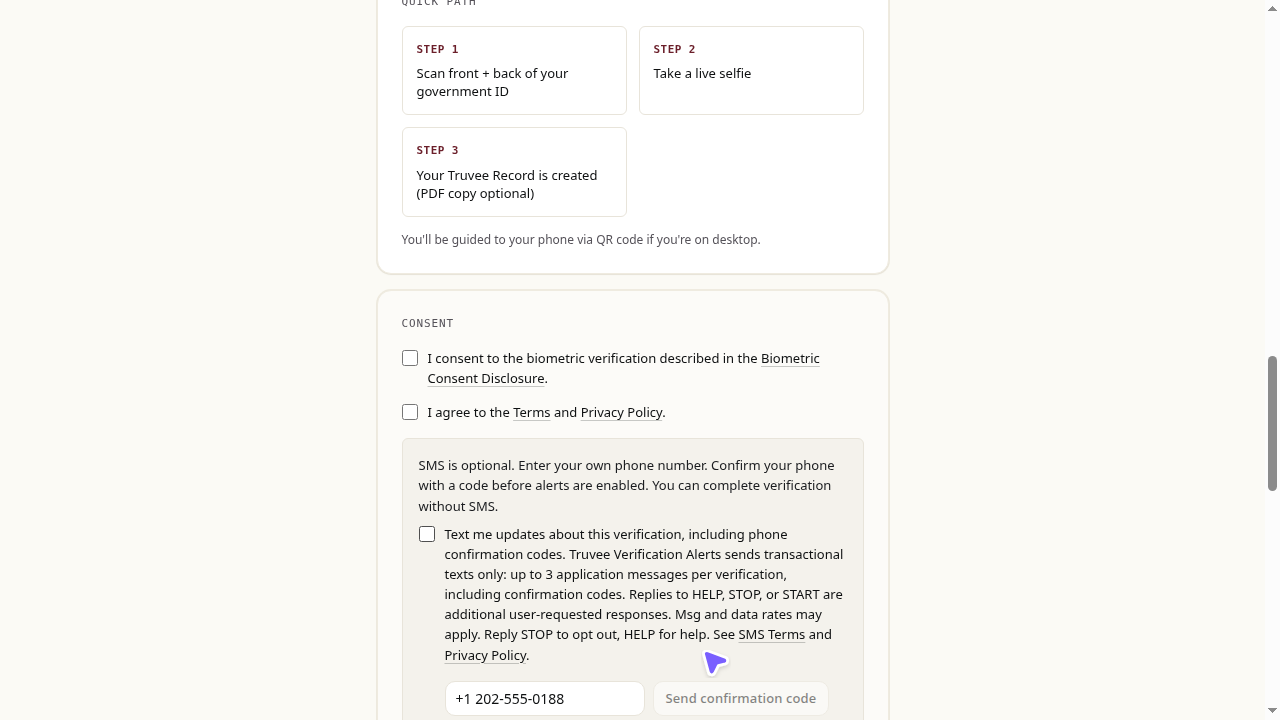
Open the active verification link received by email or personally shared by the sender. The sender cannot consent on your behalf.
- Choose the optional, initially unchecked checkbox; enter your own US phone number.
- Request a confirmation code. This affirmative website consent happens before the first SMS, which contains the code.
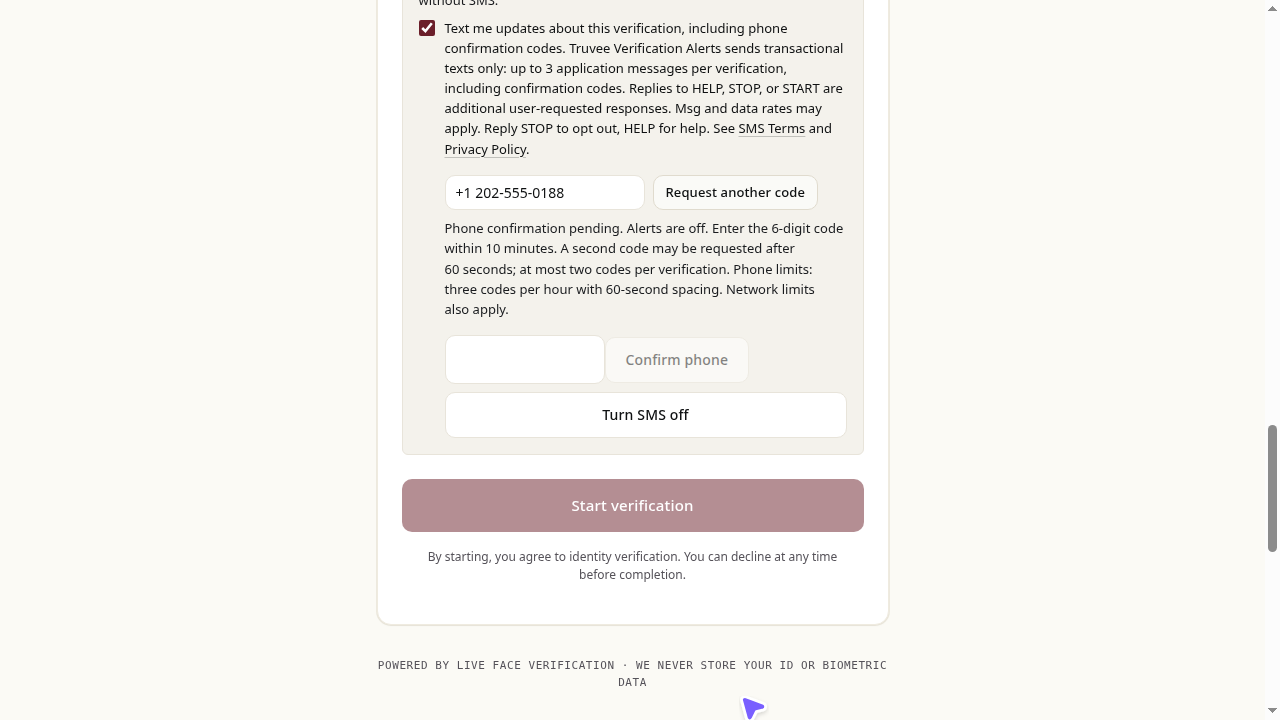
- While the code is pending, lifecycle alerts remain off. Enter the six-digit code within ten minutes; incorrect or expired codes do not enable alerts.
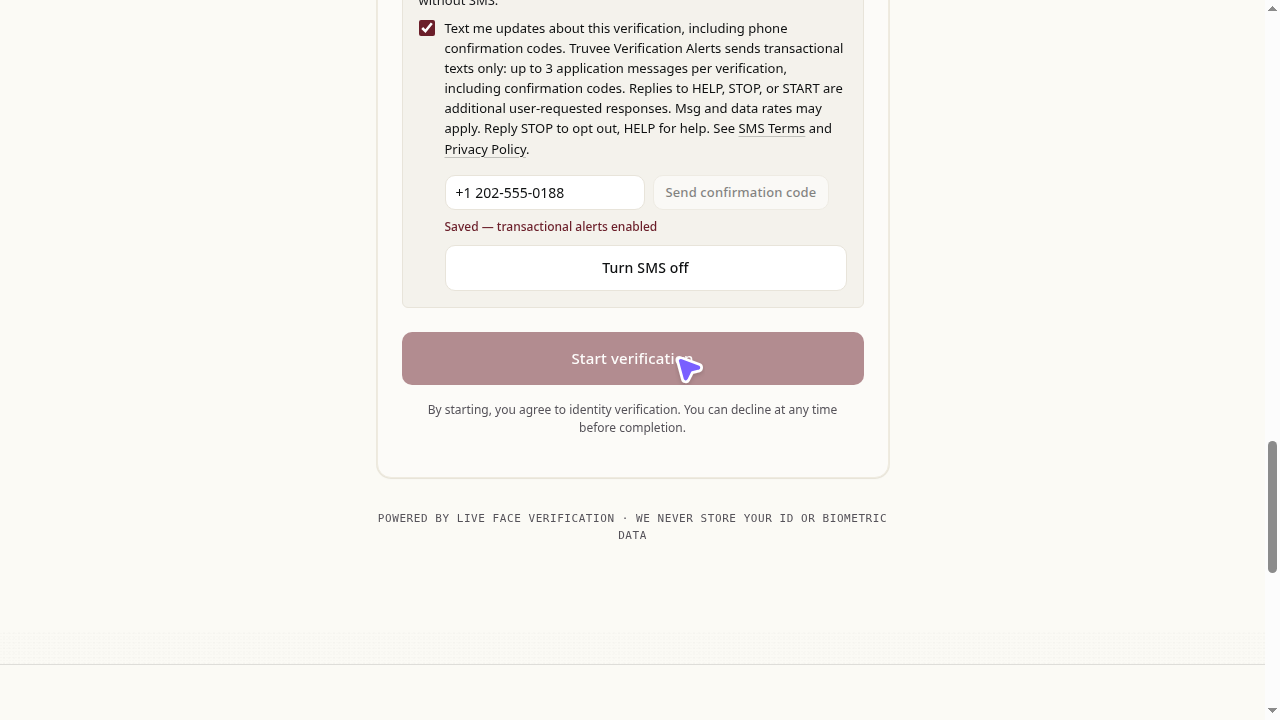
- After valid confirmation, an enrollment acknowledgement is recorded and attempted. The website distinguishes pending, provider-accepted, delivered, failed and uncertain outcomes. A confirmed failure permits one requested retry after 60 seconds; an uncertain send must be reviewed instead. Code and acknowledgement attempts do not consume status-alert slots. Future eligible record-ready alerts may be sent; no catch-up messages are sent.
- Turn SMS off or reply STOP to revoke. START alone does not restore consent: return to the website, opt in afresh and confirm again. Changing a number also requires fresh consent and confirmation.
Historical development captures — before acknowledgement support, synthetic responses only
Captured October 8, 2026 on the actual recipient verification page. API responses were intercepted; no email, SMS, payment or identity check occurred. These images demonstrate interface states only.
Account holder / sender
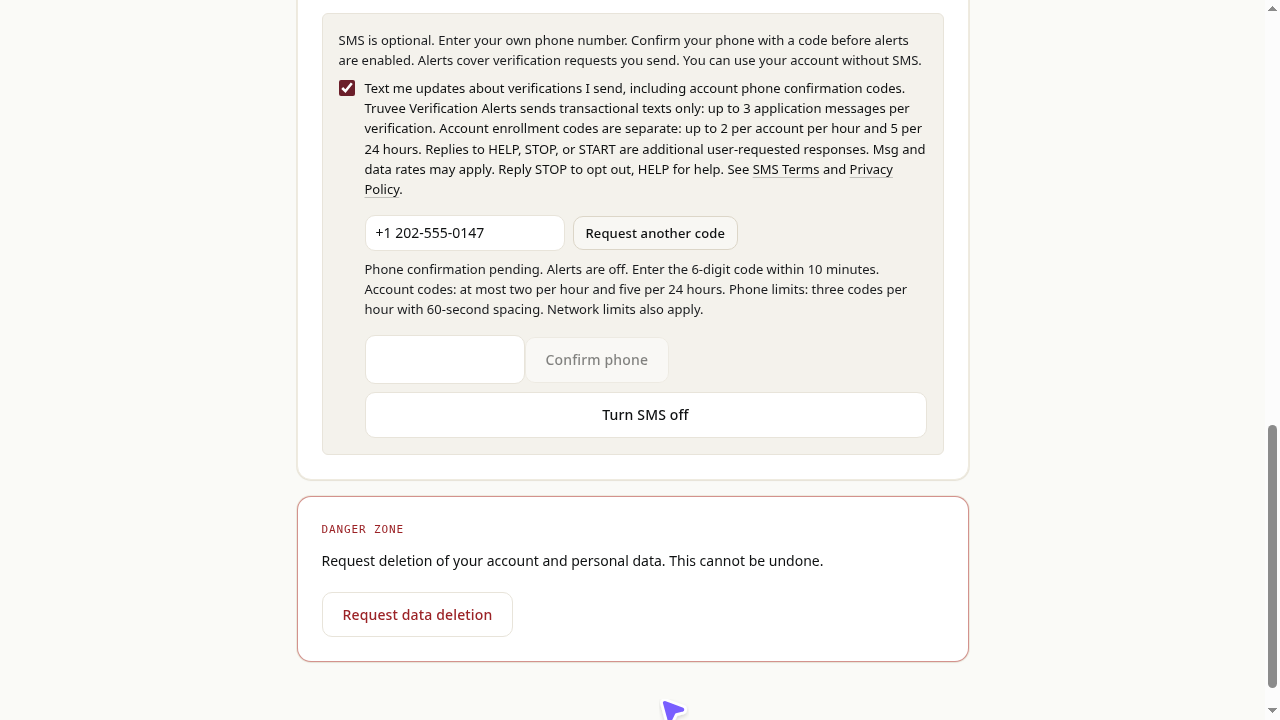
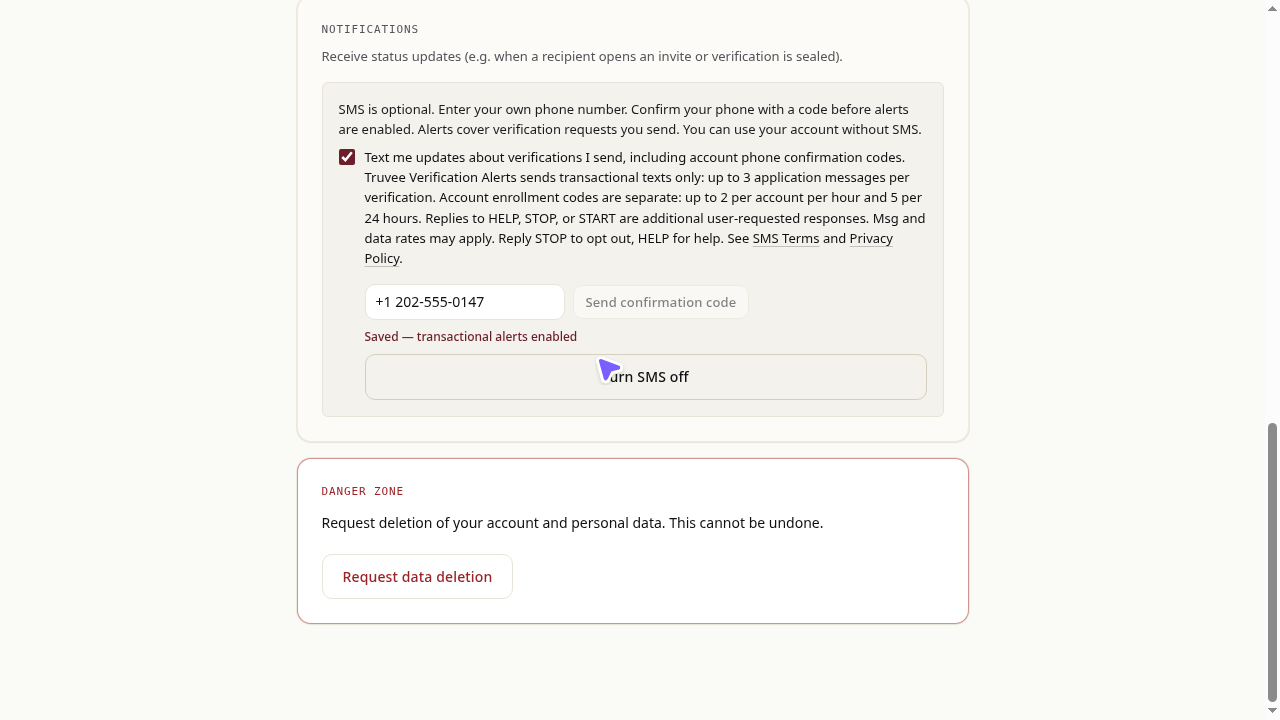
Sign in, then open Dashboard → Settings. Only your own account's number is enrolled.
- Choose the optional, initially unchecked checkbox; enter your own US phone number.
- Request a confirmation code. This affirmative website consent happens before the first SMS, which contains the code.
- While the code is pending, lifecycle alerts remain off. Enter the six-digit code within ten minutes; incorrect or expired codes do not enable alerts.
- After valid confirmation, an enrollment acknowledgement is recorded and attempted. The website distinguishes pending, provider-accepted, delivered, failed and uncertain outcomes. A confirmed failure permits one requested retry after 60 seconds; an uncertain send must be reviewed instead. Code and acknowledgement attempts do not consume status-alert slots. Future eligible request-opened and record-ready alerts may be sent; no catch-up messages are sent.
- Turn SMS off or reply STOP to revoke. START alone does not restore consent: return to the website, opt in afresh and confirm again. Changing a number also requires fresh consent and confirmation.
Historical development captures — before acknowledgement support, synthetic responses only
Captured October 8, 2026 on the actual Settings page. API responses were intercepted; no email, SMS, payment or identity check occurred. These images demonstrate interface states only.
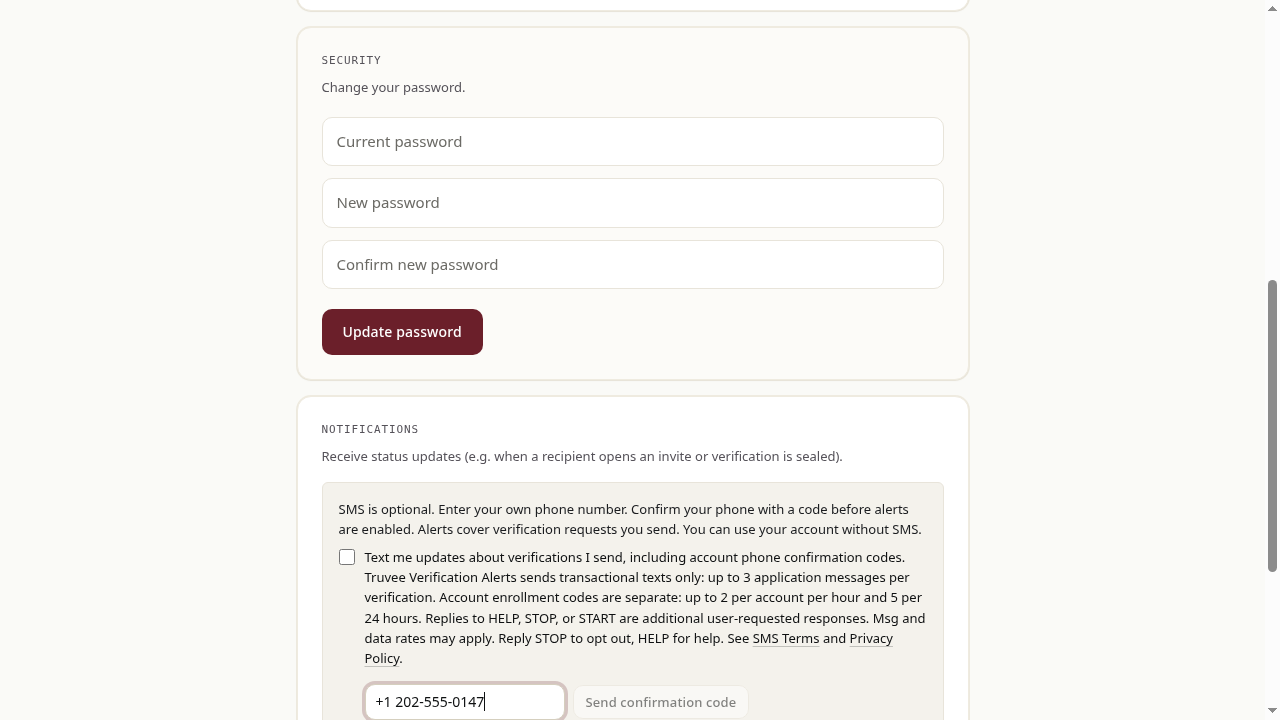
SMS is optional. You can complete verification or use your account without enrolling. Saved or pending preferences may appear checked when returning to the actual enrollment page; fresh consent starts unchecked.